Prologue
Hello, and welcome (back) to the dev log for my cookbook project “PlatePal” (working title). In my latest coding session, I focused on securing the previously prepared Spring Boot backend for this project. Although I haven’t had the opportunity to take an IT Security course at university, I understand the importance of securing user data and protecting both them and my systems from attacks.
I have some experience with the Spring Security library from previous university projects. However, I believe my solutions should not be used as a template or a good solution for that matter, as I mainly explored the topic out of personal interest rather than it being a requirement. If you have any suggestions, please feel free to share them with me - I am always looking to learn from more experienced devs.
Overview & General Progress (TLDR)
Tasks I worked on during this session:
- ✅ User database
- Added accounts table to already existent schema to store user data
- ✅ Spring security with JWT
- My main task here was admittedly to copy a solution I had previously written for a different project. However, I will still attempt to break down the most important parts of the code.
User database
As of now, the required user data is not very extensive - and thanks to Liquibase adding a table for this little information is a mere effort of writing a small SQL migration.
create table platepal_accounts.account
(
    account_id    bigserial
        constraint account_pk
            primary key,
    password_hash text,
    email_address text,
    created_at    timestamp
);
To be able to access this table in the Spring Boot application, I also added an Account entity class and an accompanying JpaRepository:
@Entity
@NoArgsConstructor
@Getter
@Table(name = "account", schema = "platepal_accounts")
public class Account {

    @Id
    @GeneratedValue(strategy = GenerationType.IDENTITY)
    @Column(name = "account_id")
    private Long accountId;

    @Setter
    private String emailAddress;

    @Column(name = "password_hash")
    @Setter
    private String password;

    @CreationTimestamp
    private Instant createdAt;

    public Account(String emailAddress, String password) {
        this.emailAddress = emailAddress;
        this.password = password;
    }

}
public interface AccountRepository extends JpaRepository<Account, Long> {

    Optional<Account> findByEmailAddress(String emailAddress);

    Optional<Account> findByPassword(String password);
}
To a familiar Java/Spring Boot developer, this may be considered basic and potentially uninteresting. However, since this is the first Java code I wrote for this project, I decided to showcase it here and provide some explanations.
The Account class serves as an entity, mapping Java objects to the corresponding database table rows. An entity class requires a default constructor (with no arguments) and a field annotated with @Id. It’s worth noting that the @Getter, @Setter, and @NoArgsConstructor annotations are all provided by the Lombok library, which significantly reduces the length of this class.
The AccountRepository enables CRUD (Create, Read, Update, Delete) operations on the account table. If you haven’t worked with Spring Data or JPA (Java Persistence API) before, I recommend exploring the functionality offered by the parent interface, JpaRepository
. Additionally, I have included two methods that I later found necessary for the Spring Security solution. Thanks to the query builder mechanism included in Spring Data, I didn’t have to manually implement the query methods. Instead, Spring Data utilizes the keywords
in the method name and the provided parameters to generate the corresponding query automatically.
Spring Security with JWT
In a previous university project called Valit (check it out here ), I had already invested a significant amount of time in figuring out how to secure a Rest API in a backend Spring Boot application. It was obvious to me that I should use Spring Security, but learning how to use it was not as straightforward. Since I had already faced this challenge before, I decided to simply migrate my code to the new project, which also involved migrating everything from Spring Boot 2 to Spring Boot 3.
Finding a system that works
Now, I knew I wanted to use Spring Security, but where should I go from there. A simple Google-Search “spring security for backend api” helped. Sorting through the mass of foreign abbreviations of terms took a moment, and led me through numerous further research adventures (specifically mentioning OAuth here because.. OAuth is cool, but absolutely not what I wanted). The common ground I found was a solution with JWT Tokens - which I had never heard of before. So let’s take a look at how a flow for the authentication process with JWTs could look like:
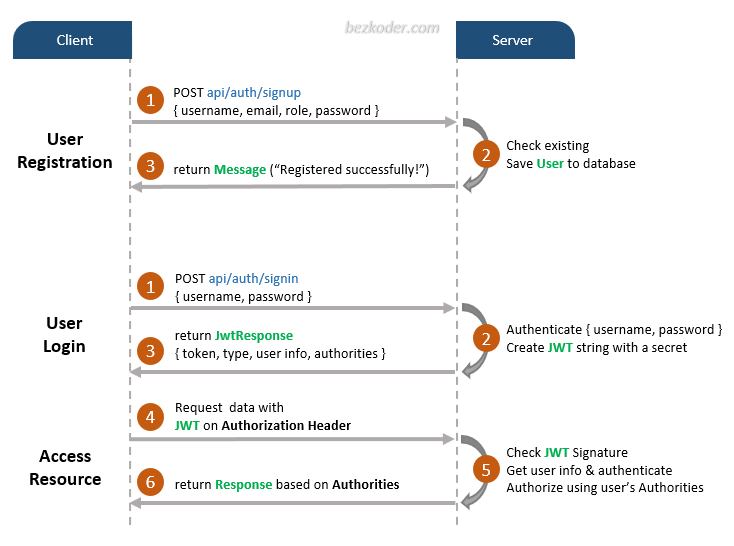
From my understanding, this was a pretty simple and straightforward solution - and considering I found hundreds of resources on how to implement it, I concluded it was trustworthy enough.
Implementation of Auth with JWT
There is no big use in me repeating what I found in other places of the internet - so here are the resources I mainly used:
- Spring Boot Token based Authentication with Spring Security & JWT by BezKoder
- Spring Boot Security + JWT Hello World Example by javainuse.com
- Protect REST APIs with Spring Security and JWT by Hantsy on medium.com
What I had to figure out on my own mostly surrounded the topic of persisting the users data. I decided to implement the UserDetailsManager interface myself, because the provided JdbcUserDetailsManager is bound to a very rigid database structure, and I felt I may need more control over my account database in the future (if you know why the the JdbcUserDetailsManager is so harc-coded to use a database table called “users” please let me know).
@Service
public class AccountService implements UserDetailsManager {

    private final AccountRepository repository;

    public AccountService(AccountRepository repository) {
        this.repository = repository;
    }

    @Override
    public UserDetails loadUserByUsername(String username) throws UsernameNotFoundException {
        return Mappers.getMapper(PlatePalUserDetailsMapper.class).accountToUserDetails(
                repository.findByEmailAddress(username).orElseThrow(
                        () -> new UsernameNotFoundException("No user found with username = " + username)));
    }

    @Override
    public void createUser(UserDetails user) {
        createUser(Mappers.getMapper(PlatePalUserDetailsMapper.class).userDetailsToAccount((PlatePalUserDetails) user));
    }

    @Override
    public void updateUser(UserDetails user) {
        updateUser(Mappers.getMapper(PlatePalUserDetailsMapper.class).userDetailsToAccount((PlatePalUserDetails) user));
    }

    @Override
    public void deleteUser(String username) {
        Account account = repository.findByEmailAddress(username).orElseThrow(
                () -> new UsernameNotFoundException("No User found for username -> " + username));
        repository.delete(account);
    }

    /**
     * This method assumes that both oldPassword and the newPassword params are encoded with configured passwordEncoder
     *
     * @param oldPassword the old password of the user
     * @param newPassword the new password of the user
     */
    @Override
    @Transactional
    public void changePassword(String oldPassword, String newPassword) {
        Account userDetails = repository.findByPassword(oldPassword)
                .orElseThrow(() -> new UsernameNotFoundException("Invalid password "));
        userDetails.setPassword(newPassword);
        repository.save(userDetails);
    }

    @Override
    public boolean userExists(String username) {
        return repository.findByEmailAddress(username).isPresent();
    }

}
Migrating to Spring Boot 3
Because I initially wrote this code in Java 11 and Spring Boot 2, I had a bit of migrating to do.
- Some packages had been renamed, namely
- javax.persistence → jakarta.persistence
- javax.servlet → jakarta.servlet
- I had to refactor my SecurityConfig because some Annotations and Classes had been deprecated, but the functionality remained the same. The final code looks like this:
@Configuration
@EnableWebSecurity
public class SecurityConfig {

    private final AccountService accountService;

    private final AuthEntryPointJwt unauthorizedHandler;

    public SecurityConfig(AccountService accountService, AuthEntryPointJwt unauthorizedHandler) {
        this.accountService = accountService;
        this.unauthorizedHandler = unauthorizedHandler;
    }

    @Bean
    public AuthTokenFilter authenticationJwtTokenFilter() {
        return new AuthTokenFilter();
    }

    @Bean
    public SecurityFilterChain securityFilterChain(HttpSecurity http) throws Exception {
        http
            .csrf().disable()
            .exceptionHandling().authenticationEntryPoint(unauthorizedHandler).and()
            .authorizeHttpRequests(authorize -> authorize
                .requestMatchers("/api/auth/register", "/api/auth/login")
                .permitAll())
            .authorizeHttpRequests(authorize -> authorize
                .anyRequest().authenticated())
            .addFilterBefore(authenticationJwtTokenFilter(), UsernamePasswordAuthenticationFilter.class);
        return http.build();
    }

    @Bean
    public BCryptPasswordEncoder passwordEncoder() {
        return new BCryptPasswordEncoder();
    }

    @Bean
    public DaoAuthenticationProvider getAuthenticationProvider() {
        DaoAuthenticationProvider authenticationProvider = new DaoAuthenticationProvider();
        authenticationProvider.setUserDetailsService(accountService);
        authenticationProvider.setPasswordEncoder(passwordEncoder());
        return authenticationProvider;
    }

    @Bean
    public AuthenticationManager authenticationManager(AuthenticationConfiguration authConfiguration) throws Exception {
        return authConfiguration.getAuthenticationManager();
    }

}
Other than that, there were no major issues migrating to Spring Boot 3. I am not surprised though, since Java is very adamant about backwards compatibility - so Spring Boot probably tries to do the same.
This was all I wanted to implement as security-wise for now, though I do have small backlog of things I definitely want to add in the future:
- Confirmation of account creation via email
- Allow login with username or email-address
- Social login with Google, Apple
I have created a social login with Spotify before, so if you are interested in that, check out this project: Soundmate .