Prologue
Hi - and welcome to Dev Log number five for my cookbook project “PlatePal”. In the last session we went through the creation process of the recipe database schema, which I strongly built upon for the next bit of progress: The REST API. This turned out to be a much bigger task than I had anticipated - mostly because I was very much used to all the utilities available at my workplace, but not for my private projects. I knew that I would have to write a lot of code for this task, but I thought it would be trivial. Instead I ran into quite a few issues with JPA/Hibernate and Mapstruct, though I finally managed to resolve them all to my satisfaction. I will most likely have to tinker with the resulting endpoints again once I start implementing the frontend of PlatePal, but with the completion of this task a great foundation for future development has been laid.
Overview & General Progress (TLDR)
Tasks I worked on during this session:
- ✅ Recipe database API:
- Creating the necessary entity classes and repositories
- Planning and implementing the necessary endpoints
- Testing with Postman
Recipe database API
Entity classes and relationships
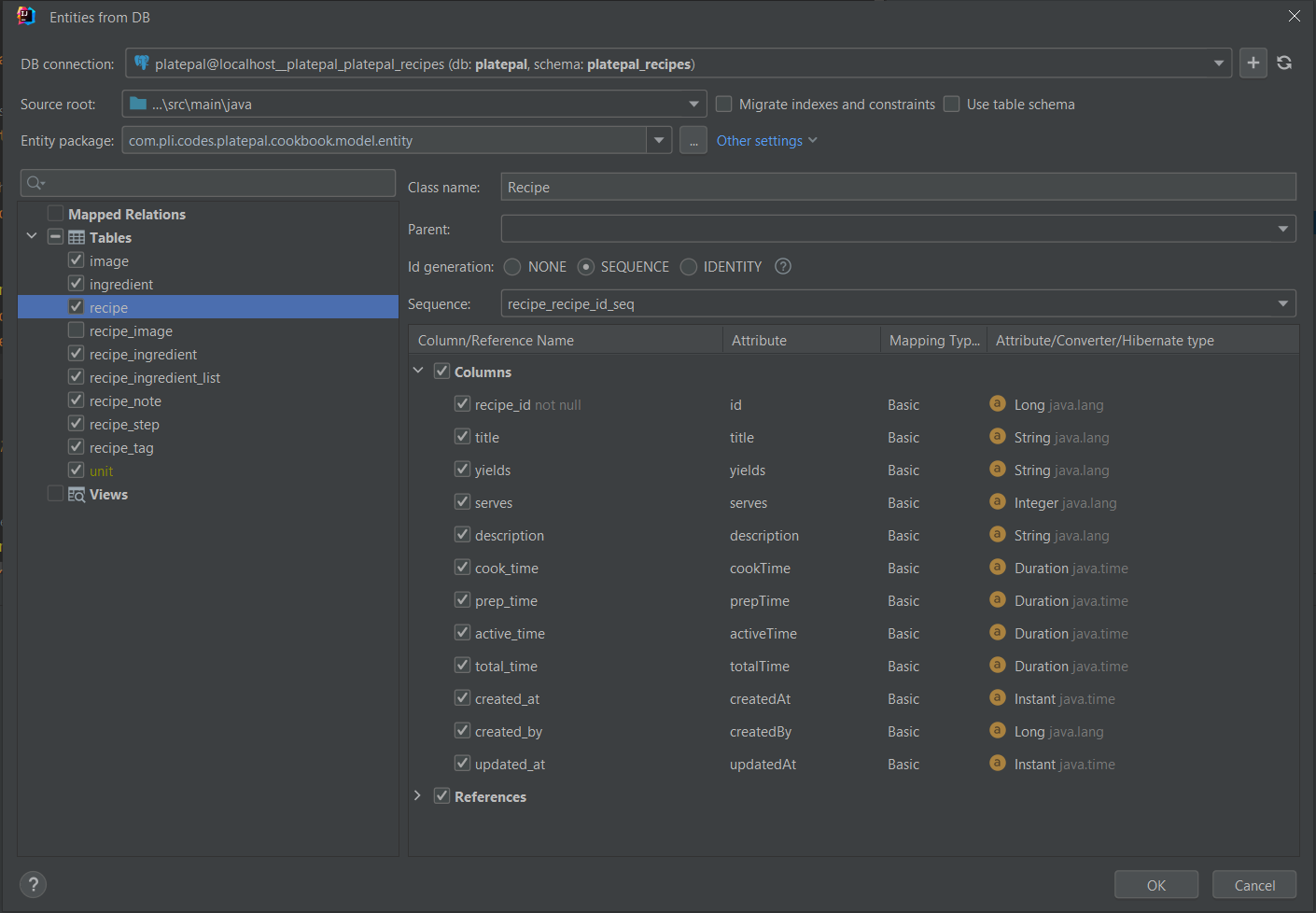
For this part of the task I found myself using yet another very helpful tool: JPA Buddy . Having access to a database as a datasource in IntelliJ, JPA Buddy provides a UI for entity class code generation. As is usual with generated code, it needed thorough review, but it saved me from writing almost 700 lines of (very repetitive) code by hand.
@NoArgsConstructor
@Getter
@Setter
@Entity
@Table(name = "recipe_note", schema = "platepal_recipes")
public class RecipeNote {

    @Id
    @GeneratedValue(strategy = GenerationType.SEQUENCE, generator = "recipe_note_id_gen")
    @SequenceGenerator(
            name = "recipe_note_id_gen",
            sequenceName = "recipe_note_note_id_seq",
            allocationSize = 1
    )
    @Column(name = "note_id", nullable = false)
    private Long id;

    @ManyToOne(fetch = FetchType.LAZY)
    @OnDelete(action = OnDeleteAction.CASCADE)
    @JoinColumn(name = "recipe_id")
    private Recipe recipe;

    @Column(name = "note_text", length = Integer.MAX_VALUE)
    private String noteText;

}
As you can tell from the RecipeNote example - JPA Buddy picks up every little bit of information from the database and maps it into the JPA entities. This is not how I would have written the code myself - but mostly because I am lazy. This is very detailed and descriptive, which is a good thing if you don’t want to go back and force between the database and the java application a lot during development.
Nevertheless, the generated code isn’t free of faults. Throughout the work on the REST-API I went through quite a bit of it for refactoring and fixes.
Getters and Setters
As you can see, JPA buddy generates all entity classes with the @Getter and @Setter annotation. This is not good
practice in my opinion because there are quite a few fields managed by other annotations, the JPA structure or even the
database itself. Because of this I removed the @Setter annotation on top of the classes and instead added it to the
fields where it was required. I have gathered a few of those cases for you:
@CreationTimestampand@UpdateTimestampAny field annotated with one of these annotations will never need a setter. Instead, the field value is populated by the annotation itself.
@OneToManyor@ManyToManyRelationshipsFields for these relationships are always displayed by collections (I used ArrayLists). Instead of setting a new instance of a collection you can simply clear or work with the old instance.
Generated ids
The database contains quite a few tables with ids generated by a sequence. Once an entity/row has been created, you will never have to change its’ id (at least not through your java application). A setter here is not only unnecessary, but also dangerous. With a REST-API open to users, they might be able to change the id’s through an update method, which could become a privacy concern - or lead to broken data in the database.
Generated Ids and Embedded Ids
Besides editable ids being a security concern, JPA Buddy produced two more issues with ids - the first being very easy to solve.
The creation of entities with generated ids resulted in the following error:
Relation »recipe_note_note_id_seq« does not exist. This was due to the missing schema property in the
@SequenceGenerator annotation. For the RecipeNote.java class above the fix looked like this:
@SequenceGenerator(
        name = "recipe_note_id_gen",
        sequenceName = "recipe_note_note_id_seq",
        allocationSize = 1,
        schema = "platepal_recipes"
)
The other issue involving ids was less of a mistake by JPA buddy, but more of a change required for my REST-API to more
easily access data. For classes with composite primary keys it had generated @Embeddable id-classes like this one:
@NoArgsConstructor
@Getter
@Embeddable
public class RecipeTagId implements Serializable {

    private static final long serialVersionUID = -8162430754199063698L;
    @Column(name = "tag_title", nullable = false, length = Integer.MAX_VALUE)
    private String tagTitle;

    @Column(name = "recipe_id", nullable = false)
    private Long recipeId;

    @Override
    public boolean equals(Object o) {
        if (this == o) {
            return true;
        }
        if (o == null || Hibernate.getClass(this) != Hibernate.getClass(o)) {
            return false;
        }
        RecipeTagId entity = (RecipeTagId) o;
        return Objects.equals(this.tagTitle, entity.tagTitle) && Objects.equals(this.recipeId, entity.recipeId);
    }

    @Override
    public int hashCode() {
        return Objects.hash(tagTitle, recipeId);
    }

}
Due to the id being an embedded class, the resulting entity looked like this:
@NoArgsConstructor
@Getter
@Setter
@Entity
@Table(name = "recipe_tag", schema = "platepal_recipes")
public class RecipeTag {

    @EmbeddedId
    private RecipeTagId id;

    @MapsId("recipeId")
    @ManyToOne(fetch = FetchType.LAZY, optional = false)
    @OnDelete(action = OnDeleteAction.CASCADE)
    @JoinColumn(name = "recipe_id", nullable = false)
    private Recipe recipe;

}
So, while the tagTitle is the most important piece information in the RecipeTag class, it was hidden behind access to
the id. Adding a tag to a recipe would have been way too complicated with this: Creating an instance of the entity,
creating an instance of the Id, setting the Id in the entity instance.. it’s not only a lot of effort for a small task,
but as I said above: setter access to an id is a security concern. So I decided to use a different solution for
composite primary keys: @IdClass:
@Getter
public class RecipeTagId implements Serializable {

    private static final long serialVersionUID = 964089307616701952L;

    private String tagTitle;
    private Long recipe;

    @Override
    public boolean equals(Object o) {
        if (this == o) {
            return true;
        }
        if (o == null || Hibernate.getClass(this) != Hibernate.getClass(o)) {
            return false;
        }
        RecipeTagId entity = (RecipeTagId) o;
        return Objects.equals(this.tagTitle, entity.tagTitle) && Objects.equals(this.recipe, entity.recipe);
    }

    @Override
    public int hashCode() {
        return Objects.hash(tagTitle, recipe);
    }

}
@NoArgsConstructor
@Getter
@Setter
@Entity
@IdClass(RecipeTagId.class)
@Table(name = "recipe_tag", schema = "platepal_recipes")
public class RecipeTag {

    @Id
    @ManyToOne(fetch = FetchType.LAZY, optional = false)
    @OnDelete(action = OnDeleteAction.CASCADE)
    @JoinColumn(name = "recipe_id", nullable = false)
    private Recipe recipe;

    @Id
    @Column(name = "tag_title")
    private String tagTitle;

}
Relationships
Although JPA Buddy did a great job creating the desired relations as mapped fields, some information simply cannot be read from the database, which mainly includes intended behaviour within the JPA systems. When I first implemented the recipe creation endpoint, this introduced only one big question: How do I persist nested data? Let me explain that a bit more in depth. I created my endpoint, which accepted json data like this:
{
  "title": "Grilled Cheese",
  "yields": 1,
  "description": "The sandwich to rule them all",
  "totalTime": "PT5M",
  "recipeTags": [
    "SNACK",
    "QUICK",
    "VEGETARIAN"
  ],
  "recipeIngredientLists": [
    {
      "recipeIngredients": [
        {
          "ingredientId": 2,
          "quantity": 1,
          "process": "slice"
        },
        {
          "ingredientId": 3,
          "quantity": 2,
          "process": "slices"
        }
      ]
    }
  ],
  "recipeSteps": [
    {
      "stepNumber": 1,
      "stepText": "Grill the cheese"
    }
  ],
  "recipeNoteTexts": [
    "Everybody loves this"
  ]
}
I quickly realized that this data did not only include one singular recipe entity, but also a RecipeIngredientList
entity, two RecipeIngredient entities, one RecipeStep, one RecipeNote and three RecipeTags. With the current state of
the code, I would have needed to create
and repository.save()
every single one of these instances separately. With some help from good ol’ google I found out about
the cascade
property in OneToMany and ManyToMany relationships in JPA.
Thanks to CascadeType.*ALL* I could simply link all the created entities, and save the “parent” - from where the save
operation would cascade down.
Enums
JPA Buddy cannot create enums (afaik), which is not surprising. The PostgreSQL functionality to create custom data types is not very common. This is luckily an easily solve. For my custom type unit_type I simply added the following code:
@Column(name = "unit_type", columnDefinition = "unit_type")
@Enumerated(EnumType.STRING)
@Type(PostgreSQLEnumType.class)
private UnitType unitType;
public enum UnitType {
    WEIGHT, VOLUME
}
Endpoint development
To get started with the actual REST-API, I took some time to collect a list of all the required endpoints:
- Login & Register (this was already done in a previous task)
- Get collections linked to account (small - only preview information)
- Get latest recipes updated by account (small)
- CRUD for collections and recipes
- Create Ingredient(s) and Unit(s)
- Add recipe(s) to collection
Had I simply resorted to using Spring Data Rest , I probably would have save 90% of the time I spent on this task. Spring Data Rest provides endpoints on top of JpaRepositories, which would have at least taken away writing the CRUD-API endpoints per hand, if not all other endpoints as well. But because I have come to learn that this is very unsafe I opted to write the code myself instead.
Luckily, I have gotten to know quite a few of good practices for this process already - namely the usage of Data Transfer Objects (DTOs) and Mapstruct . Using DTOs in this scenario allows proper protection of the data integrity in my database, but also introduces a whole lot of extra code.
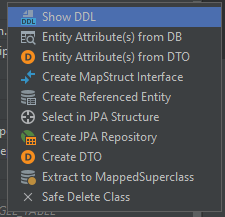
Because the whole process for this task was very long, I am going to showcase the creation of only the four CRUD endpoints for recipes.
Step 1: Creation of the Request and Response DTO
You may wonder why one would need two DTOs for one request, but I mentioned my reasoning for this earlier: Editable ids are dangerous. There should never be a case in which the client needs to update the id of a database entry. So even if there is no other difference between the Request- and Response-DTO, at least the id should only be included in the latter.
@AllArgsConstructor
@Getter
public class RecipeRequestDto {

    private final String title;
    private final String yields;
    private final Integer serves;
    private final String description;
    private final Duration cookTime;
    private final Duration prepTime;
    private final Duration activeTime;
    private final Duration totalTime;
    private final List<Long> imageIds;
    private final List<RecipeIngredientListRequestDto> recipeIngredientLists;
    private final List<String> recipeNoteTexts;
    private final List<RecipeStepRequestDto> recipeSteps;
    private final List<String> recipeTags;
}
@AllArgsConstructor
@Getter
public class RecipeResponseDto {

    private final Long id;
    private final String title;
    private final String yields;
    private final Integer serves;
    private final String description;
    private final Duration cookTime;
    private final Duration prepTime;
    private final Duration activeTime;
    private final Duration totalTime;
    private final Instant createdAt;
    private final Long createdBy;
    private final Instant updatedAt;
    private final List<String> imagePaths;
    private final List<RecipeIngredientListDto> recipeIngredientLists;
    private final List<RecipeNoteDto> recipeNotes;
    private final List<RecipeStepDto> recipeSteps;
    private final List<String> recipeTags;
}
As you can see, there’s a few more differences between those than just the id. The createdAt, createdBy and updatedAt properties are not to be set by the client, but rather by business/JPA logic.
Step 2: Creation of the DTO Mapper
Usually, Mapstruct would make this step a trivial matter. But with entities/DTOs who are nested this much, there are a few more things to pay attention to. Let’s go through the RecipeMapper class one-by-one.
@Mapping(target = "imagePaths", expression = "java(imagesToImagePaths(recipe.getImages()))")
@Mapping(target = "recipeTags", expression = "java(recipeTagsToTagTitles(recipe.getRecipeTags()))")
RecipeResponseDto toDto(Recipe recipe);

default List<String> imagesToImagePaths(List<Image> images) {
    return images.stream().map(Image::getPath).toList();
}

default List<String> recipeTagsToTagTitles(List<RecipeTag> tags) {
    return tags.stream().map(RecipeTag::getTagTitle).toList();
}
The recipe entity does not contain the tags and images as a List of Strings but rather as a List of their according entities. Thats why the mapper needs to be instructed on how to convert those two fields correctly
@Mapping(target = "recipeNotes", source = "recipeNoteTexts")
Recipe toEntity(RecipeRequestDto recipeRequestDto, @Context IngredientRepository ingredientRepository);

@Mapping(target = "ingredient", source = "ingredientId")
RecipeIngredient toRecipeIngredientEntity(
        RecipeIngredientRequestDto recipeIngredient,
        @Context IngredientRepository ingredientRepository
);

default Ingredient toIngredientEntity(Long ingredientId, @Context IngredientRepository ingredientRepository) {
    return ingredientRepository.findById(ingredientId).orElseThrow();
}

default RecipeNote noteTextToRecipeNoteEntity(String recipeNoteText) {
    RecipeNote recipeNote = new RecipeNote();
    recipeNote.setNoteText(recipeNoteText);
    return recipeNote;
}

default RecipeTag recipeTagTitleToRecipeTagEntity(String recipeTagTitle) {
    RecipeTag recipeTag = new RecipeTag();
    recipeTag.setTagTitle(recipeTagTitle);
    return recipeTag;
}
When creating a recipe entity, I decided to not hand in ingredients to be created as new rows, but instead the DTO would
include ingredientIds for already existent ingredients. Because of this I had to provide the IngredientRepository as a
context variable, to be able to retrieve the desired entity from the database within the mapping function. This is done
in the toIngredientEntity method.
As an inversion to the code above, the mapper also needed instructions on how to create RecipeTag and RecipeNote entities from simple Strings.
@Mapping(target = "recipeNotes", source = "recipeNoteTexts")
@BeanMapping(nullValuePropertyMappingStrategy = NullValuePropertyMappingStrategy.IGNORE)
Recipe partialUpdate(
        RecipeRequestDto recipeRequestDto,
        @MappingTarget Recipe recipe,
        @Context IngredientRepository ingredientRepository
);
All of the methods used for the toEntity functionality above are also used in this partialUpdate method. But instead of creating a new Recipe entity, this merges/updates the data in a given existent entity. This will be used for the update API endpoint.
@AfterMapping
default void linkRecipeSteps(@MappingTarget Recipe recipe) {
    recipe.getRecipeSteps().forEach(recipeStep -> recipeStep.setRecipe(recipe));
}

@AfterMapping
default void linkRecipeNotes(@MappingTarget Recipe recipe) {
    recipe.getRecipeNotes().forEach(recipeNote -> recipeNote.setRecipe(recipe));
}

@AfterMapping
default void linkRecipeTags(@MappingTarget Recipe recipe) {
    recipe.getRecipeTags().forEach(recipeTag -> recipeTag.setRecipe(recipe));
}
When creating new entities that are nested within the main recipe entity, the mapper needs to make sure that they are
linked to their “parent” properly. This is done with a @AfterMapping method.
Step 3: Write and secure the endpoints
With all of the DTO conversion logic handled in the mapper, there is only little left to do within the controller class.
@RestController
@RequestMapping("/api/recipe")
@CrossOrigin
public class RecipeController {

    private final RecipeRepository repository;
    private final IngredientRepository ingredientRepository;
    private final AccountRepository accountRepository;

    public RecipeController(
            RecipeRepository repository,
            IngredientRepository ingredientRepository,
            AccountRepository accountRepository
    ) {
        this.repository = repository;
        this.ingredientRepository = ingredientRepository;
        this.accountRepository = accountRepository;
    }

    @GetMapping("/{id}")
    public ResponseEntity<RecipeResponseDto> getRecipe(@PathVariable Long id) {
        Optional<Recipe> byId = repository.findById(id);
        if (byId.isPresent()) {
            Recipe recipe = byId.get();
            return ResponseEntity.ok(RecipeMapper.INSTANCE.toDto(recipe));
        }
        return new ResponseEntity<>(HttpStatus.NOT_FOUND);
    }

    @PostMapping
    public ResponseEntity<RecipeResponseDto> createRecipe(
            @RequestBody RecipeRequestDto requestDto,
            Principal principal
    ) {
        Account account = accountRepository.findByEmailAddress(principal.getName()).orElseThrow();
        Recipe recipe = RecipeMapper.INSTANCE.toEntity(requestDto, ingredientRepository);
        recipe.setCreatedBy(account.getAccountId());
        repository.save(recipe);
        return ResponseEntity.ok(RecipeMapper.INSTANCE.toDto(recipe));
    }

    @PatchMapping("/{id}")
    public ResponseEntity<RecipeResponseDto> updateRecipe(
            @PathVariable Long id,
            @RequestBody RecipeRequestDto requestDto,
            Principal principal
    ) {
        Account account = accountRepository.findByEmailAddress(principal.getName()).orElseThrow();
        Optional<Recipe> byId = repository.findById(id);
        if (byId.isPresent()) {
            Recipe recipe = byId.get();
            if (Objects.equals(recipe.getCreatedBy(), account.getAccountId())) {
                RecipeMapper.INSTANCE.partialUpdate(requestDto, recipe, ingredientRepository);
                repository.save(recipe);
                return ResponseEntity.ok(RecipeMapper.INSTANCE.toDto(recipe));
            } else {
                return new ResponseEntity<>(HttpStatus.UNAUTHORIZED);
            }
        }
        return new ResponseEntity<>(HttpStatus.NOT_FOUND);
    }

    @DeleteMapping("/{id}")
    public ResponseEntity<Void> deleteRecipe(@PathVariable Long id, Principal principal) {
        Account account = accountRepository.findByEmailAddress(principal.getName()).orElseThrow();
        Optional<Recipe> byId = repository.findById(id);
        if (byId.isPresent()) {
            Recipe recipe = byId.get();
            if (Objects.equals(recipe.getCreatedBy(), account.getAccountId())) {
                repository.delete(recipe);
                return new ResponseEntity<>(HttpStatus.ACCEPTED);
            } else {
                return new ResponseEntity<>(HttpStatus.UNAUTHORIZED);
            }
        }
        return new ResponseEntity<>(HttpStatus.NOT_FOUND);
    }
}
Step 4: Test with Postman
At this point the only thing left to do is testing (and documentation…), which I did with Postman:
Once I made sure that all the required endpoints worked as expected and returned the desired HTTP status, I put the ticket into “Done” and can now look forward to finally working on the frontend for this project.